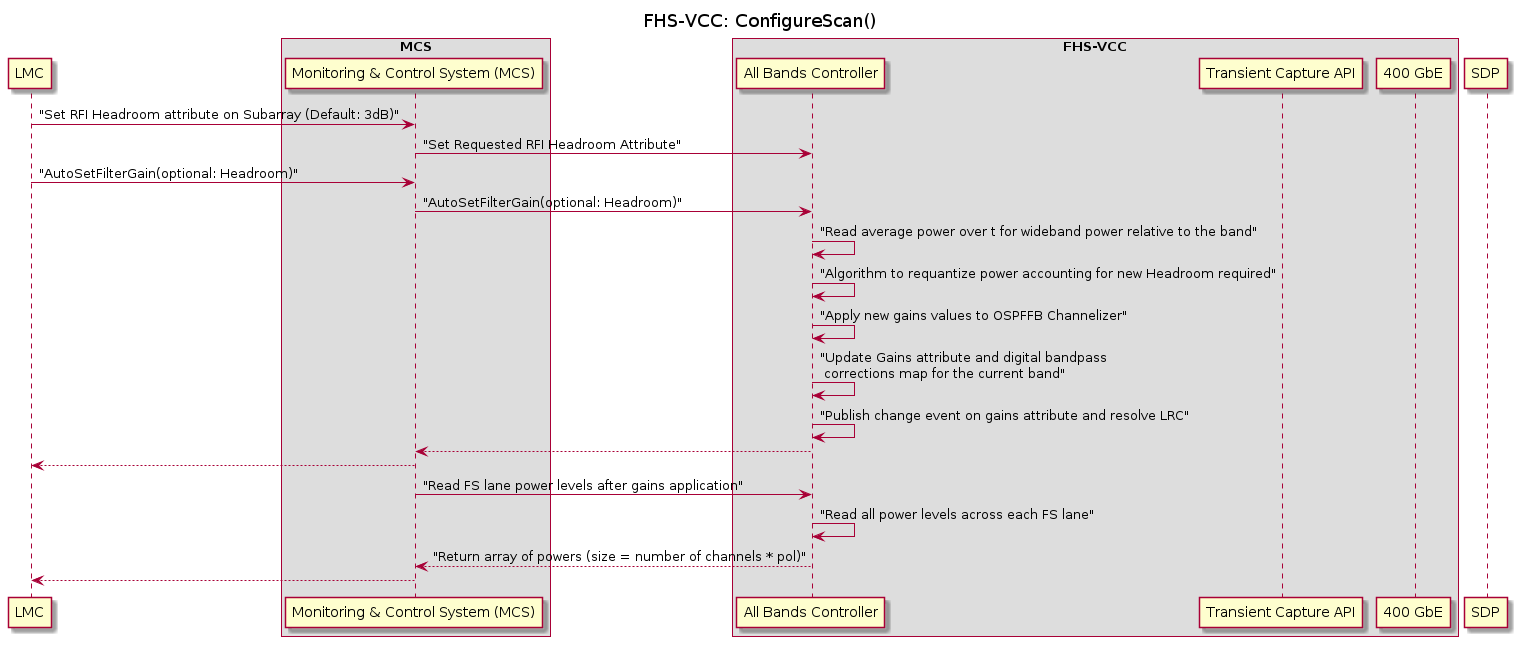
Autoset Gains FHS-VCC

@startuml fhs_vcc_configure_scan

title FHS-VCC: ConfigureScan()

participant "LMC" as lmc

box "MCS"
    participant "Monitoring & Control System (MCS)" as mcs
end box

box "FHS-VCC"
    participant "All Bands Controller" as allbands
    participant "Transient Capture API" as api
    participant "400 GbE" as 400g
end box

participant "SDP" as sdp
lmc -> mcs: "Set RFI Headroom attribute on Subarray (Default: 3dB)"
mcs -> allbands: "Set Requested RFI Headroom Attribute"
lmc -> mcs: "AutoSetFilterGain(optional: Headroom)"
mcs -> allbands: "AutoSetFilterGain(optional: Headroom)"
allbands -> allbands: "Read average power over t for wideband power relative to the band"
allbands -> allbands: "Algorithm to requantize power accounting for new Headroom required"
allbands -> allbands: "Apply new gains values to OSPFFB Channelizer"
allbands -> allbands: "Update Gains attribute and digital bandpass \n corrections map for the current band"
allbands -> allbands: "Publish change event on gains attribute and resolve LRC"
mcs <-- allbands
lmc <-- mcs
mcs -> allbands: "Read FS lane power levels after gains application"
allbands -> allbands: "Read all power levels across each FS lane"
mcs <-- allbands: "Return array of powers (size = number of channels * pol)"
lmc <-- mcs

@enduml

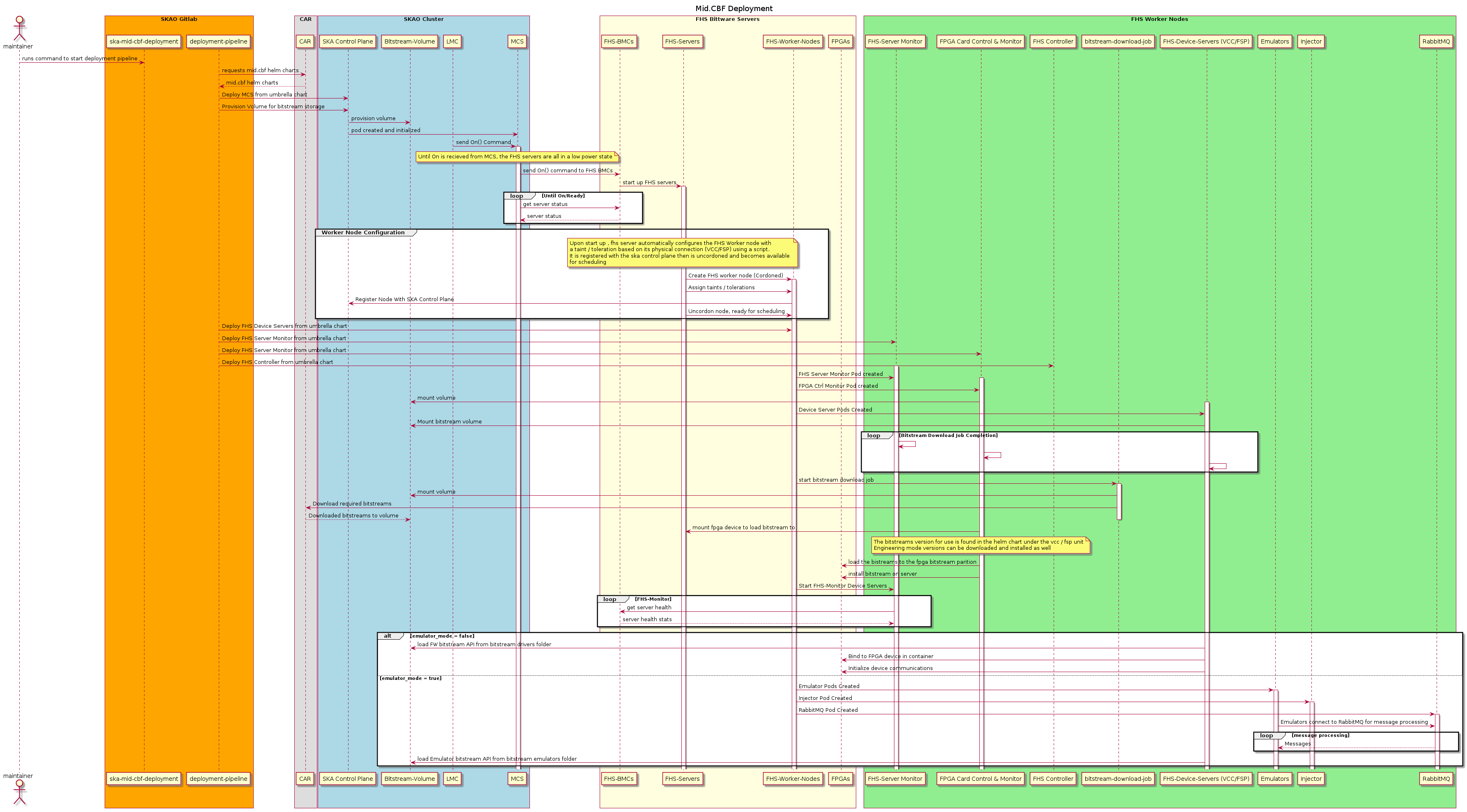
Deployment Sequence

@startuml deployment

title Mid.CBF Deployment

actor maintainer as maintainer

box "SKAO Gitlab" #orange
participant "ska-mid-cbf-deployment" as skaMidCbfDeployment
participant "deployment-pipeline" as deploymentPipeline
end box

box "CAR"
participant "CAR" as car
end box

box "SKAO Cluster" #lightblue
participant "SKA Control Plane" as skaCluster
participant "Bitstream-Volume" as bitstreamVolume
participant "LMC" as lmc
participant "MCS" as mcs
end box

box "FHS Bittware Servers" #lightyellow
participant "FHS-BMCs" as fhsBmcs
participant "FHS-Servers" as fhsServers
participant "FHS-Worker-Nodes" as fhsWorkerNodes
participant "FPGAs" as fpgas
end box

box "FHS Worker Nodes" #lightgreen
participant "FHS-Server Monitor" as fhsServerMonitor
participant "FPGA Card Control & Monitor" as fpgaCardCtrlMonitor
participant "FHS Controller" as fhsController
participant "bitstream-download-job" as bitstreamDownloadJob
participant "FHS-Device-Servers (VCC/FSP)" as fhsDeviceServers
participant "Emulators" as emulators
participant "Injector" as injector
participant "RabbitMQ" as rabbitMq

end box

maintainer->skaMidCbfDeployment: runs command to start deployment pipeline
deploymentPipeline->car:requests mid.cbf helm charts
car-->deploymentPipeline: mid.cbf helm charts
deploymentPipeline->skaCluster: Deploy MCS from umbrella chart
deploymentPipeline->skaCluster: Provision Volume for bitstream storage
skaCluster->bitstreamVolume: provision volume
skaCluster->mcs: pod created and initialized
lmc->mcs: send On() Command
activate mcs
note over mcs
Until On is recieved from MCS, the FHS servers are all in a low power state
end note
mcs->fhsBmcs: send On() command to FHS BMCs
fhsBmcs->fhsServers: start up FHS servers
activate fhsServers
loop Until On/Ready
mcs->fhsBmcs: get server status
fhsBmcs-->mcs: server status
end
group Worker Node Configuration
note over fhsServers
Upon start up , fhs server automatically configures the FHS Worker node with
a taint / toleration based on its physical connection (VCC/FSP) using a script.
It is registered with the ska control plane then is uncordoned and becomes available 
for scheduling
end note
fhsServers->fhsWorkerNodes: Create FHS worker node (Cordoned)
activate fhsWorkerNodes
fhsServers->fhsWorkerNodes: Assign taints / tolerations
fhsWorkerNodes->skaCluster: Register Node With SKA Control Plane
fhsServers->fhsWorkerNodes: Uncordon node, ready for scheduling
end
deploymentPipeline->fhsWorkerNodes: Deploy FHS Device Servers from umbrella chart
deploymentPipeline->fhsServerMonitor: Deploy FHS Server Monitor from umbrella chart
deploymentPipeline->fpgaCardCtrlMonitor: Deploy FHS Server Monitor from umbrella chart
deploymentPipeline->fhsController: Deploy FHS Controller from umbrella chart


activate fhsServerMonitor
fhsWorkerNodes->fhsServerMonitor: FHS Server Monitor Pod created

activate fpgaCardCtrlMonitor
fhsWorkerNodes->fpgaCardCtrlMonitor: FPGA Ctrl Monitor Pod created
fpgaCardCtrlMonitor->bitstreamVolume: mount volume


activate fhsDeviceServers
fhsWorkerNodes->fhsDeviceServers: Device Server Pods Created
fhsDeviceServers->bitstreamVolume: Mount bitstream volume

loop Bitstream Download Job Completion
fhsServerMonitor->fhsServerMonitor
fpgaCardCtrlMonitor->fpgaCardCtrlMonitor
fhsDeviceServers->fhsDeviceServers
end

fhsWorkerNodes->bitstreamDownloadJob: start bitstream download job
activate bitstreamDownloadJob
bitstreamDownloadJob->bitstreamVolume: mount volume
bitstreamDownloadJob->car: Download required bitstreams
car-->bitstreamVolume: Downloaded bitstreams to volume
deactivate bitstreamDownloadJob

fpgaCardCtrlMonitor->fhsServers: mount fpga device to load bitstream to
note over fpgaCardCtrlMonitor
The bitstreams version for use is found in the helm chart under the vcc / fsp unit
Engineering mode versions can be downloaded and installed as well
end note
fpgaCardCtrlMonitor->fpgas: load the bistreams to the fpga bitstream parition
fpgaCardCtrlMonitor->fpgas: install bitstream on server

fhsWorkerNodes->fhsServerMonitor: Start FHS-Monitor Device Servers
loop FHS-Monitor
fhsServerMonitor->fhsBmcs: get server health
fhsBmcs-->fhsServerMonitor: server health stats
end

alt emulator_mode = false
fhsDeviceServers->bitstreamVolume: load FW bitstream API from bitstream drivers folder
fhsDeviceServers->fpgas: Bind to FPGA device in container
fhsDeviceServers->fpgas: Initialize device communications
else emulator_mode = true
fhsWorkerNodes->emulators: Emulator Pods Created
activate emulators
fhsWorkerNodes->injector: Injector Pod Created
activate injector
fhsWorkerNodes->rabbitMq: RabbitMQ Pod Created
activate rabbitMq
emulators->rabbitMq: Emulators connect to RabbitMQ for message processing
loop message processing
rabbitMq-->emulators: Messages
end
fhsDeviceServers->bitstreamVolume: load Emulator bitstream API from bitstream emulators folder
end

@enduml

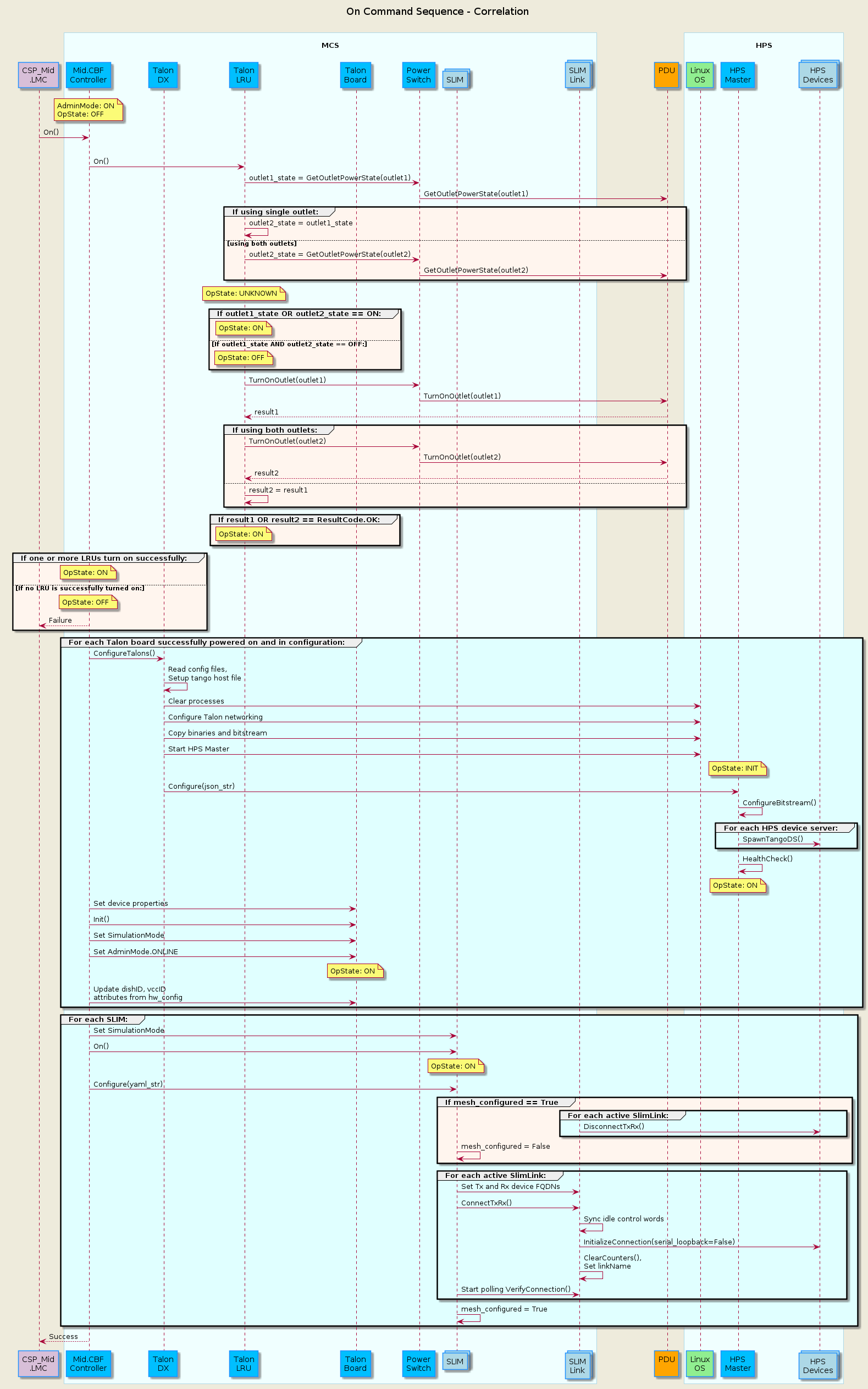
TDC On Command Sequence

@startuml
'https://plantuml.com/sequence-diagram
skinparam backgroundColor #EEEBDC
skinparam sequence {
ParticipantBorderColor DodgerBlue
ParticipantBackgroundColor DeepSkyBlue
ActorBorderColor DarkGreen
ActorBackgroundColor Green
BoxBorderColor LightBlue
BoxBackgroundColor #F0FFFF
}
skinparam collections {
  BackGroundColor LightBlue
  BorderColor DodgerBlue
}
skinparam database {
  BackgroundColor LightGreen
  BorderColor DarkGreen
}
title On Command Sequence - Correlation\n
participant "CSP_Mid\n.LMC" as lmc #Thistle
box "\nMCS\n"
  participant "Mid.CBF\nController" as controller
  participant "Talon\nDX" as tdx
  participant "Talon\nLRU" as lru
  participant "Talon\nBoard" as talon_board
  participant "Power\nSwitch" as ps
  collections "SLIM" as slim
  collections "SLIM\nLink" as slimlink
end box
participant "PDU\n" as pdu #Orange
box "\nHPS\n"
  participant "Linux\nOS" as os #LightGreen
  participant "HPS\nMaster" as hpsmaster
  collections "HPS\nDevices" as hpsdevices
end box

note over controller            : AdminMode: ON\nOpState: OFF
lmc -> controller               : On()

group #LightCyan For each Talon LRU in configuration:
  controller    ->  lru         : On()
  lru           ->  ps          : outlet1_state = GetOutletPowerState(outlet1)
  ps            ->  pdu         : GetOutletPowerState(outlet1)
  group #SeaShell If using single outlet:
    lru         ->  lru         : outlet2_state = outlet1_state
  else using both outlets
    lru         ->  ps          : outlet2_state = GetOutletPowerState(outlet2)
    ps          ->  pdu         : GetOutletPowerState(outlet2)
  end group

  note over lru                 : OpState: UNKNOWN
  group #SeaShell If outlet1_state OR outlet2_state == ON:
    note over lru               : OpState: ON
  else If outlet1_state AND outlet2_state == OFF:
    note over lru               : OpState: OFF
  end group

  lru           ->  ps          : TurnOnOutlet(outlet1)
  ps            ->  pdu         : TurnOnOutlet(outlet1)
  pdu           --> lru         : result1
  group #SeaShell If using both outlets:
    lru         ->  ps          : TurnOnOutlet(outlet2)
    ps          ->  pdu         : TurnOnOutlet(outlet2)
    pdu         --> lru         : result2
  else
    lru         ->  lru         : result2 = result1
  end group

  group #SeaShell If result1 OR result2 == ResultCode.OK:
    note over lru               : OpState: ON
end group

group #SeaShell If one or more LRUs turn on successfully:
  note over controller               : OpState: ON
else If no LRU is successfully turned on:
  note over controller               : OpState: OFF
  lmc           <--  controller   : Failure
end group

group #LightCyan For each Talon board successfully powered on and in configuration:
  controller    ->  tdx         : ConfigureTalons()
  tdx           ->  tdx         : Read config files,\nSetup tango host file
  tdx           ->  os          : Clear processes
  tdx           ->  os          : Configure Talon networking
  tdx           ->  os          : Copy binaries and bitstream
  tdx           ->  os          : Start HPS Master
  note over hpsmaster           : OpState: INIT
  tdx           ->  hpsmaster   : Configure(json_str)
  hpsmaster     ->  hpsmaster   : ConfigureBitstream()
  group #LightCyan For each HPS device server:
    hpsmaster  -> hpsdevices    : SpawnTangoDS()
  end group
  hpsmaster     ->  hpsmaster   : HealthCheck()
  note over hpsmaster           : OpState: ON

  controller    ->  talon_board : Set device properties
  controller    ->  talon_board : Init()
  controller    ->  talon_board : Set SimulationMode
  controller    ->  talon_board : Set AdminMode.ONLINE
  note over talon_board         : OpState: ON
  controller    ->  talon_board : Update dishID, vccID\nattributes from hw_config
end group

group #LightCyan For each SLIM:
  controller      ->  slim      : Set SimulationMode
  controller      ->  slim      : On()
  note over slim                : OpState: ON
  controller      ->  slim      : Configure(yaml_str)
  group #SeaShell If mesh_configured == True
    group #LightCyan For each active SlimLink:
      slimlink    -> hpsdevices : DisconnectTxRx()
    end group
    slim          ->  slim      : mesh_configured = False
  end group

  group #LightCyan For each active SlimLink:
    slim        ->  slimlink    : Set Tx and Rx device FQDNs
    slim        ->  slimlink    : ConnectTxRx()
    slimlink    ->  slimlink    : Sync idle control words
    slimlink    ->  hpsdevices  : InitializeConnection(serial_loopback=False)
    slimlink    ->  slimlink    : ClearCounters(),\nSet linkName
    slim        ->  slimlink    : Start polling VerifyConnection()
  end group
  slim          ->  slim        : mesh_configured = True
end group

lmc           <--  controller   : Success

@enduml

TDC Assign Resources

@startuml
'https://plantuml.com/sequence-diagram

skinparam backgroundColor #EEEBDC
skinparam sequence {
    ParticipantBorderColor DodgerBlue
    ParticipantBackgroundColor DeepSkyBlue
    ActorBorderColor DarkGreen
    ActorBackgroundColor Green
    BoxBorderColor LightBlue
    BoxBackgroundColor #F0FFFF
}
skinparam collections {
    BackGroundColor LightBlue
    BorderColor DodgerBlue
}

title MCS Correlation Assign Resources\n

participant "TMC\n" as tmc #Gold
participant "CSP_Mid\n.LMC" as lmc #Thistle
box "\nMCS\n"
    participant "Mid.CBF\nSubarray" as subarray
    collections "VCC\n" as vcc
    collections "Talon\nBoard" as talon
end box

note over subarray       : ObsState: EMPTY
lmc         ->  subarray     : AssignResources(list[str])
note over subarray           : ObsState: RESOURCING
group #LightCyan For each receptor in argin:
    subarray    -> subarray  : Validate receptors in argin
end group

group #SeaShell If len(valid receptors) > 0:
    group #LightCyan For each receptor:
        subarray    -> vcc       : Update simulationMode
        subarray    -> vcc       : AdminMode.ONLINE
        note over vcc            : OpState: ON
        subarray    ->  vcc      : Update subarrayMembership
        subarray    ->  talon    : Update subarrayID
    end group

    subarray    ->  subarray     : Update receptors
    note over subarray       : ObsState: IDLE
else Failure in AssignResources, ObsState unchanged
    note over subarray       : ObsState: EMPTY
end group


lmc        <--  subarray     : Success

@enduml

TDC Release Resources

@startuml
'https://plantuml.com/sequence-diagram

skinparam backgroundColor #EEEBDC
skinparam sequence {
    ParticipantBorderColor DodgerBlue
    ParticipantBackgroundColor DeepSkyBlue
    ActorBorderColor DarkGreen
    ActorBackgroundColor Green
    BoxBorderColor LightBlue
    BoxBackgroundColor #F0FFFF
}
skinparam collections {
    BackGroundColor LightBlue
    BorderColor DodgerBlue
}

title MCS Correlation Release Resources\n

participant "TMC\n" as tmc #Gold
participant "CSP_Mid\n.LMC" as lmc #Thistle
box "\nMCS\n"
    participant "Mid.CBF\nSubarray" as subarray
    collections "VCC\n" as vcc
    collections "Talon\nBoard" as talon
end box

lmc             ->  subarray    : ReleaseResources(list[str])
note over subarray              : ObsState: RESOURCING
group #LightCyan For each receptor in argin:
    subarray    -> subarray     : Validate receptors in argin
    subarray    -> vcc          : Reset subarrayMembership to 0
    subarray    -> vcc          : AdminMode.OFFLINE
    note over vcc               : OpState: DISABLE
    subarray    ->  talon       : Reset subarrayID
end group

subarray    ->  subarray        : Update receptors

group #SeaShell If len(receptors) == 0:
    note over subarray          : ObsState: EMPTY
else
    note over subarray          : ObsState: IDLE
end group


lmc        <--  subarray     : Success

@enduml