LMC to MCS
MCS provides attributes and commands to initialize, monitor and terminate Mid.CBF operations through the controller, and attributes and commands to configure and execute scans through the 16 subarrays.
The sequence diagram below shows the interactions between LMC and MCS to assign dish resources to a subarray, configure a scan’s parameters, and execute a scan. It demonstrates configuration of a single subarray, beginning and ending with the subarray in its unresourced state. The calls to write the frequency offset K and frequency offset delta F values only need to be written when there are updates to the values. They must be provided to the Controller before the scan configuration.
For full details on MCS controller and subarray design see Design Notes
For full MCS Controller API see CbfController.
For full MCS Subarray API see CbfSubarray.
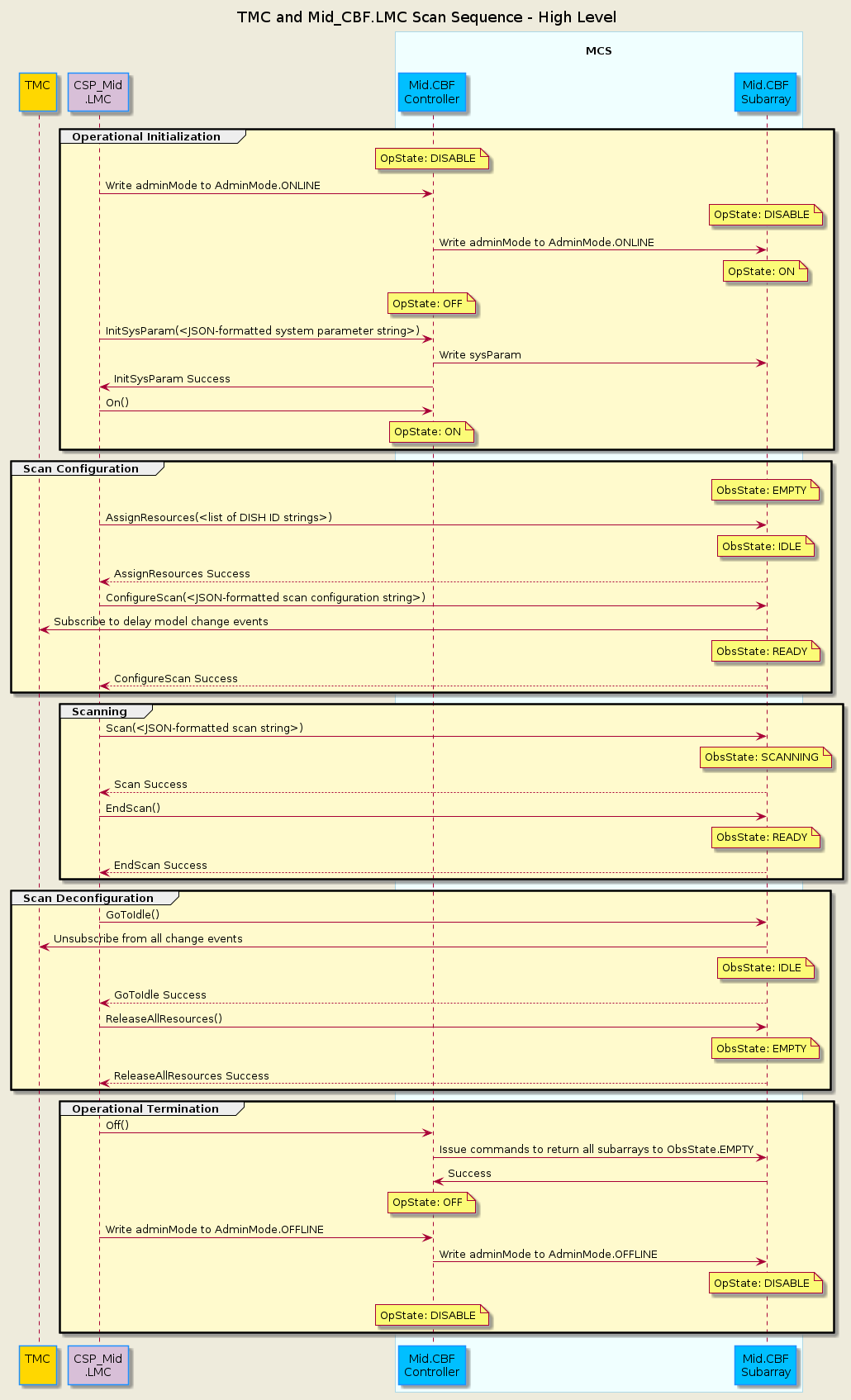
CbfController Tango Commands
Command |
Parameters |
Return Type |
Action |
Supported Interface(s) |
|---|---|---|---|---|
Off |
None |
(ResultCode, str) |
Set power state to OFF for controller and
subordinate devices (subarrays, VCCs, FSPs)
Turn off power to all hardware
|
|
InitSysParam |
JSON str* |
(ResultCode, str) |
Initialize Dish ID to VCC ID mapping and k values
See also InitSysParam Sequence
|
https://schema.skao.int/ska-mid-cbf-initsysparam/1.0
https://schema.skao.int/ska-mid-cbf-initsysparam/1.1
|
Standby |
None |
(ResultCode, str) |
None
|
|
On |
None |
(ResultCode, str) |
Turn on the controller and subordinate devices
|
|
SetResourceAdminMode |
JSON str* |
(ResultCode, str) |
Update the admin mode of the specific VCC Units or FSP Units
See also Engineering Mode
|
https://schema.skao.int/ska-mid-cbf-setresourceadminmode/1.0
https://schema.skao.int/ska-mid-cbf-setresourceadminmode/1.1
|
* Schema for JSON string defined in the Telescope Model - Mid.CBF schemas
CbfController Tango Attributes
Attribute |
Parameters |
Read/Write |
Return Type |
Configured Events |
Description |
Interface Version |
|---|---|---|---|---|---|---|
resourceStatus |
None |
Read Only |
JSON str* |
None |
Status of the VCC and FSP resources available to the Controller The attributes provides the following information:
|
https://schema.skao.int/ska-mid-cbf-resourcestatus/1.0
|
sysParam |
None |
Read Only |
JSON str |
None |
Returns a mapping of Dish ID to VCC and frequency offset k as a JSON formatted string. |
https://schema.skao.int/ska-mid-cbf-initsysparam/1.0
https://schema.skao.int/ska-mid-cbf-initsysparam/1.1
|
sourceSysParam |
None |
Read Only |
JSON str |
None |
Returns the source and file path to the file to be retrieved through the Telescope Model as a JSON formatted string. |
|
dishToVcc |
None |
Read Only |
str list |
None |
Returns Dish ID to VCC mapping as a list, in the format ‘dishID:vccID’. |
|
vccToDish |
None |
Read Only |
str list |
None |
Returns VCC to Dish ID mapping as a list, in the format ‘vccID:dishID’. |
|
maxCapabilities |
None |
Read Only |
str list |
None |
Returns the maximum number of instances of each capability type. Formatted as: “VCCUnit: n VCC:n FSP:n Subarray:n”. |
|
validateSupportedConfiguration |
Boolean |
Read and Write |
Boolean |
None |
Sets/Returns if restrictive validation is requested for configurations. Defaults to True, setting to False can cause unexpected behaviour. For the validation rules, see Supported ConfigureScan Validation . |
* Schema for JSON string defined in the Telescope Model - Mid.CBF schemas
CbfSubarray Tango Commands
Command |
Parameters |
Return Type |
Action |
Supported Interface(s) |
|---|---|---|---|---|
Abort |
JSON str* |
(ResultCode, str) |
Change observing state to ABORTED
Send Abort to VCC
Send Abort to FSP <function mode> Subarrays
No action on hardware
See also Abort Sequence
|
https://schema.skao.int/ska-mid-cbf-abort/1.0
|
AssignResources |
JSON str* |
(ResultCode, str) |
Assign resources to this subarray
Turn subarray to ObsState = IDLE if no
receptor was previously assigned
|
https://schema.skao.int/ska-mid-cbf-assignresources/1.0
|
ConfigureScan |
JSON str* |
(ResultCode, str) |
Change observing state to READY
Configure attributes from input JSON
Subscribe events
Configure VCC, VCC subarray, FSP, FSP Subarray
Publish output links.
See also Configure Scan Sequence
|
https://schema.skao.int/ska-csp-configurescan/10.0
|
EndScan |
JSON str* |
(ResultCode, str) |
End the scan
|
https://schema.skao.int/ska-csp-endscan/2.3
|
ObsReset |
JSON str* |
(ResultCode, str) |
Reset subarray scan configuration
Keep assigned receptors
Reset observing state to IDLE
If in FAULT, send Abort/ObsReset to VCC
If in FAULT, send Abort/ObsReset to
FSP <function mode> subarrays
No action on hardware
See also ObsReset Sequence
|
https://schema.skao.int/ska-mid-cbf-obsreset/1.0
|
Off |
None |
(ResultCode, str) |
Set subarray power mode to off.
Commands FSP<function mode> Subarrays
to turn off
No action on hardware power
|
|
On |
None |
(ResultCode, str) |
Set subarry power mode to on.
Command FSP<function mode> Subarrays
to turn on
|
|
ReleaseAllResources |
JSON str* |
(ResultCode, str) |
Release all resources
Turn Subarray off if no receptors are
assigned
|
https://schema.skao.int/ska-mid-cbf-releaseallresources/1.0
|
ReleaseResources |
JSON str* |
(ResultCode, str) |
Release Resources in input list
Change observing state to EMPTY if no
receptors assigned
|
https://schema.skao.int/ska-mid-cbf-releaseresources/1.0
|
Restart |
JSON str* |
(ResultCode, str) |
Reset subarray scan configuration
Remove assigned receptors
Restart observing state model to EMPTY
If in FAULT, send Abort/ObsReset to VCC
If in FAULT, send Abort/ObsReset to
FSP <function mode> subarrays
No action on hardware
See also Restart Sequence
|
https://schema.skao.int/ska-mid-cbf-restart/1.0
|
Scan |
JSON str* |
(ResultCode, str) |
Start scanning
|
https://schema.skao.int/ska-csp-scan/2.3
|
* Schema for JSON string defined in the Telescope Model - Mid.CBF schemas
CbfSubarray Tango Attributes
Attribute |
Parameters |
Read/Write |
Return Type |
Configured Events |
Description |
Format |
|---|---|---|---|---|---|---|
frequencyBand |
None |
Read Only |
Dev Enum |
None |
Frequency band of the subarray (defaults to 1). |
|
dishIDs |
None |
Read Only |
Str List |
None |
Sorted list of DISH IDs assigned to subarray. |
|
assignedVCCs |
None |
Read Only |
Int List |
None |
Sorted list of VCC IDs assigned to subarray. |
|
assignedFSPs |
None |
Read Only |
Int List |
None |
Sorted list of FSP IDs assigned to subarray. |
|
sysParam |
None |
Read and Write |
Str |
None |
JSON-formatted string containing system parameters, should not be written to by components external to Mid CBF. To set commands, refer to the controller commands. |
{
    "interface": "https://schema.skao.int/ska-mid-cbf-initsysparam/1.0",
    "dish_parameters": {
        "SKA001": {
            "vcc": 1,
            "k"  : 1
        },
        "SKA036": {
            "vcc": 2,
            "k"  : 1
        },
        "SKA063": {
            "vcc": 3,
            "k"  : 1
        },
        "SKA100": {
            "vcc": 4,
            "k"  : 1
        }
    }
}
|
Supported ConfigureScan Validation
The telescope model will validate AA4 ranges, but due to ongoing development, MCS supports a subset of values for the given parameters.
Scan Configuration Parameter |
AA4 Ranges (see TM) |
Supported |
Comment |
|---|---|---|---|
band_5_tuning |
See TM |
None |
Warning This value is currently unsupported Using this value will result in a rejected scan configuration |
channel_width |
Range: Enum value that is one of: 210
420
840
1680
3360
6720
13440
26880
40320
53760
80640
107520
161280
215040
322560
416640
430080
645120
|
Range: Enum value that is one of: 13440
26880
40320
53760
80640
107520
161280
215040
322560
416640
430080
645120
|
|
frequency_band |
Strings of values: 1, 2, 5a, 5b |
Strings of values: 1, 2 |
|
frequency_band_offset_stream2 |
See TM |
None |
Warning This value is currently unsupported Using this value will result in a rejected scan configuration |
output_port |
Ranges:
Checks:
|
In addition to AA4 ranges:
|
|
rfi_flagging_mask |
See TM |
None |
Warning This value is currently unsupported Using this value will result in a rejected scan configuration |
search_window |
See TM |
None |
Warning This value is currently unsupported Using this value will result in a rejected scan configuration |
start_freq |
See TM |
Checks:
|
A warning will be logged when the processing region is outside the bounds of band 1 and 2 (350,000,000 Hz to 1,760,000,000 Hz) |
subarray_id |
Integer from 1 to 16 inclusive |
Integer of value 1 |
|
vlbi |
TBD |
None |
Warning This value is currently unsupported Using this value will result in a rejected scan configuration |